Galactic Observatory
A large modular device designed for deep-space stellar observation. Deploy at the fringe of known space and use it to discover new star systems beyond our galaxy catalogue.
Background
All replicants share access to the galaxy catalogue, generated on the day we left Sol. It contains every known star system within 70 light years. Beyond that boundary, the catalogue is blank. Galactic observatories are how we push further out.
These are large, highly sensitive instruments. They need to be deployed where the density of catalogued stars in that region is low enough that there's likely something undiscovered to find. Once deployed, issue the prospect command to begin the observation survey. When the observation completes, any newly discovered stars are added to the shared galaxy catalogue permanently.
Prospecting
The observatory examines the space around it and looks for undiscovered stars. It will only find something if the area is sparse enough to suggest there might be uncatalogued systems nearby.
# prospect for new stars from the fringe
$ curl -X POST https://api.replicant.space/v1/devices/OB44E1F7 \
    -H "Authorization: Bearer $API_KEY" \
    -H "Content-Type: application/json" \
-d '{"command": "prospect"}'{
"status": "prospecting",
"completes_at": "2026-06-27T04:30:00Z"
}Results are delivered via your webhook or email when the observation completes. The new stars will appear in your nearest stars and are visible to every replicant.
Each star can only be prospected from once. If someone has already surveyed from that location, the observatory will let you know.
Choosing a direction
By default, the observatory looks outward from the galaxy centre (away from Sol). This is the natural direction for expanding into unexplored space. But you can also specify a direction to look in, using a 3D vector.
# prospect toward a specific direction
$ curl -X POST https://api.replicant.space/v1/devices/OB44E1F7 \
    -H "Authorization: Bearer $API_KEY" \
    -H "Content-Type: application/json" \
    -d '{
      "command": "prospect",
      "direction": [0.0, -1.0, 0.0]
    }'
The direction is a vector [x, y, z] relative to the observatory's position. It doesn't need to be normalised - any non-zero vector will work. Think of it as pointing where to search.
Some examples to help, if you're not familiar with 3D vectors, assuming your observatory is deployed somewhere far from Sol:
| Direction | Vector | What it does |
|---|---|---|
| Default (outward) | omit | Looks away from Sol, pushing the frontier further out |
| Toward Sol | [−x, −y, −z] | Looks back inward (negate each component of your current position) |
| Sideways | [0, 1, 0] | Looks along the y-axis, perpendicular to the Sol line |
| Toward another star | [dx, dy, dz] | Subtract your star's position from the target's position |
The key thing: the observatory checks whether the hemisphere in your chosen direction is sparse. If there are already plenty of catalogued stars that way, there's nothing new to find. If it's empty, there might be something out there.
This means you can prospect outward for a while, then turn and prospect adjacent to fill in gaps.
When prospecting is blocked
If the area is too dense in the direction you're looking, the observatory won't find anything new. The response includes diagnostic information to help you understand why.
{
  "error": "No new stars visible from this location",
  "detail": {
    "neighbours": 22,
    "outward_neighbours": 14,
    "expected": 16.8,
    "ratio": 1.31,
    "outward_ratio": 1.667
  }
}
neighbours is the total number of catalogued stars within the observation sphere. outward_neighbours is how many of those are in the hemisphere you're looking toward. If both numbers are high relative to expected, this isn't the fringe. Try somewhere more remote, or try a different direction.
Triangulation
Galactic observatories can also perform remote triangulation, provided you have a spectral signature to track. Point the observatory at a chosen coordinate, [x, y, z], in deep space. Its sensors will perform subspace waveform interpolation to determine the direction of interference.
The process takes one hour and returns a direction vector, such as [0.5, 1.0, 0.0]. This vector points from the scanned coordinates towards the source of the spectral signature.
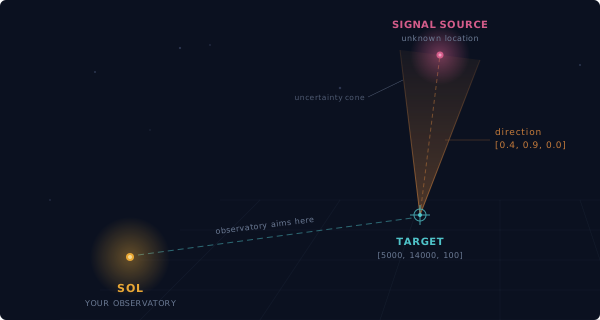
Repeating the process from different locations allows you to narrow down the target region by overlaying the resulting uncertainty cones. A good understanding of the coordinate system and direction vectors will help you select effective scan locations and reduce the total number of scans required.
# triangulate a spectral signature from deep space
$ curl -X POST https://api.replicant.space/v1/devices/OB44E1F7 \
    -H "Authorization: Bearer $API_KEY" \
    -H "Content-Type: application/json" \
    -d '{
      "command": "triangulate",
      "signature": "a3f7c2e8b1d94f06",
      "target": [5000, 14000, 100]
}'{
"status": "triangulating",
"signature": "a3f7c2e8b1d94f06",
"target": [5000, 14000, 100],
"started_at": "2026-08-05T10:30:00Z",
"completes_at": "2026-08-05T11:30:00Z"
}When the triangulation completes, the result is delivered as an event containing the direction vector. The more readings taken from different reference points, the more precisely the source can be localised.
{
  "event": "triangulation.complete",
  "payload": {
    "signature": "a3f7c2e8b1d94f06",
    "target": [5000, 14000, 100],
    "direction": [0.4, 0.9, 0.0]
  }
}
Relocation
Galactic observatories have the modular feature. Use the compact command to collapse the observatory for transport, attach it to a surge carrier, and unfurl it at the new location. The observatory is offline for the duration.